
This is an old revision of the document!
Table of Contents
System Requirements

Basic Information
| Step 1 | |
|---|---|
| Visiometa is a Windows application for the desktop PC. However compatibility is not tied to the form factor, i.e. the software can in principle also be run on SFF computers, laptops/notebooks or tablets with a suitable CPU and operating system. |  |
| Step 2 | |
|---|---|
 | Due to its demanding CAD and CAE functionality, we recommend to install Visiometa on a powerful system with good cooling performance. Also, the operating concept has been specifically designed to work with a mouse and keyboard. |
| Step 3 | |
|---|---|
| The minimum requirements specified in this document do not preclude the software from running on computers with different or weaker performance characteristics, but we cannot guarantee proper operation in this case. |  |
Hardware Requirements
Visiometa supports all x86-64 compatible CPUs from Intel starting with the Coffee Lake microarchitecture (8th generation), and from AMD starting with the Zen microarchitecture (1st generation).
The minimum size of available main memory (RAM) for the basic operation of the software is 8 GB. However, the total memory consumption for large discretizations is theoretically unlimited and depends on the specific needs of the individual user.
A dedicated graphics card is required for full video rendering functionality and a sufficiently high refresh rate.
Integrated GPUs are not officially supported, but may still work in some cases.
The minimum requirements include support for DirectX 12, Shader Model 5.1 and at least 4 GB of dedicated (non-shared) graphics memory.
A dedicated GPU from Nvidia with 8 GB of graphics memory is required to be able to use the hardware-accelerated numerical modulus computation.
The earliest suitable microarchitecture is called Pascal and includes all graphics cards of the Nvidia GeForce GTX 10 series and the Quadro P series.
For new purchases, we always recommend consumer-grade (GeForce) devices over workstation and datacenter hardware (Quadro) due to the much better price/performance ratio.
Software Requirements
The application frontend was mainly developed for Microsoft Windows 10 (version 22H2 or higher) but also runs on any Windows 11 version so far. Some of the backend components are platform independent.
Microsoft .NET Framework, version 4.7.2 or higher is required to run the user interface and business logic components. It is provided and updated automatically by Windows and does not come with our installer. In some minimalistic versions of Windows, such as Windows 10 Enterprise N-LTSC, the .NET Framework might not be included in the standard installation and must be installed manually.
The latest NVIDIA graphics drivers must be installed. It can be downloaded directly from: https://www.nvidia.com/download/find.aspx
Cloud Licensing
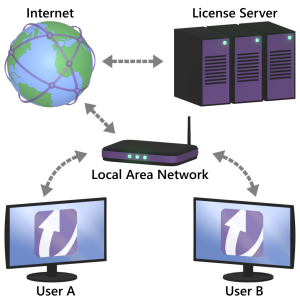 In order to use our cloud licensing, the client system must be permanently connected to the Internet while working.
The client must be allowed to establish an outgoing TCP connection on port 2310 to our license server.
All international clients can use the hostname europe.license.visiometa.com to log into their user accounts.
Local Licensing
Local licensing is implemented via a time-retaining cryptographic USB device called license dongle.
The client system needs full access to one of its USB type A ports in order to use the dongle.
Commercially available USB hubs do not always seem to support the license dongle.
Dongle sessions must be started locally on the client and cannot be shared across a network.
Other System Requirements
Visiometa requires about 2 GB of free hard disk space for the installation, depending on the selected features and examples.
The Windows user running the application must have read and write access to its own local Documents folder as well as to the common Program Data folder.
On laptop computers, the high-performance GPU must be set as the preferred graphics processor so that Visiometa can access the dedicated graphics card.
The primary monitor cable must be connected directly to the graphics card, not through the mainboard or any extension port.